Find Out If a Book Niche Will Sell Before You Write a Word
Real Amazon data. A clear verdict. No extensions, no subscription.
Shelf Scan turns the Amazon pages you save into a clear report: price bands, review counts, ratings, title patterns, gaps, and a go or no-go verdict. Save the pages as PDFs, upload them to your AI, and read the answer.
Get Shelf Scan for $7
Picking the wrong niche is an expensive mistake
A book takes weeks to write and design. A short round of research shows whether readers are buying in that niche and what the top books look like.
Guessing the niche
Choosing a topic without checking the lists, then learning the market after you publish.
Not knowing what you’re up against
No idea how many reviews the top books have.
Monthly fees
Research tools charge every month, whether you publish or not.
Tools that break
Browser add-ons and bots stop working when Amazon changes a page.
Three steps from idea to verdict
It works in the AI tool you already use. Nothing to install.
Save the page as PDF
Open a bestseller list or search results page on Amazon and scroll to the bottom. Save it as a PDF (Ctrl+P, or Cmd+P on a Mac), and copy the page text too.
Upload it to your AI
Attach the PDF and paste the text in ChatGPT, Claude, Gemini, or Perplexity, where you pasted the Shelf Scan instructions.
Read your report
You get the verdict and the 5 books worth a closer look. Save those 5 product pages, upload them, and get your finished niche report.
Not sure which list to scan? Start from one bestseller.
Every Amazon product page lists the categories the book ranks in, and every category has its own Top 100 list. Shelf Scan walks you through following those paths to the lists that matter.
A real report, not a pile of numbers
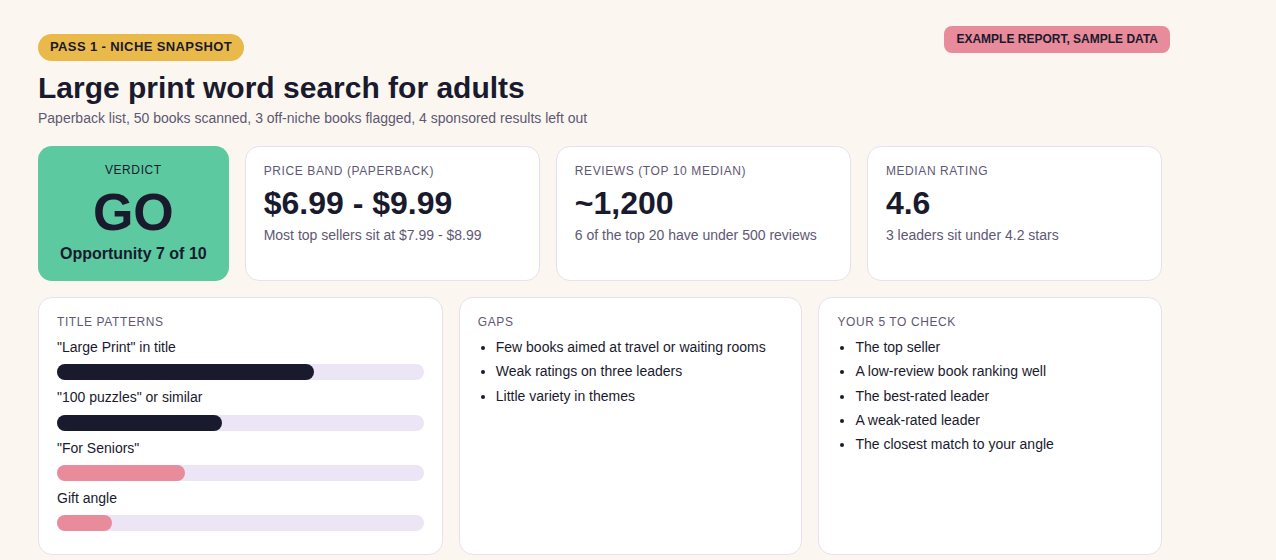
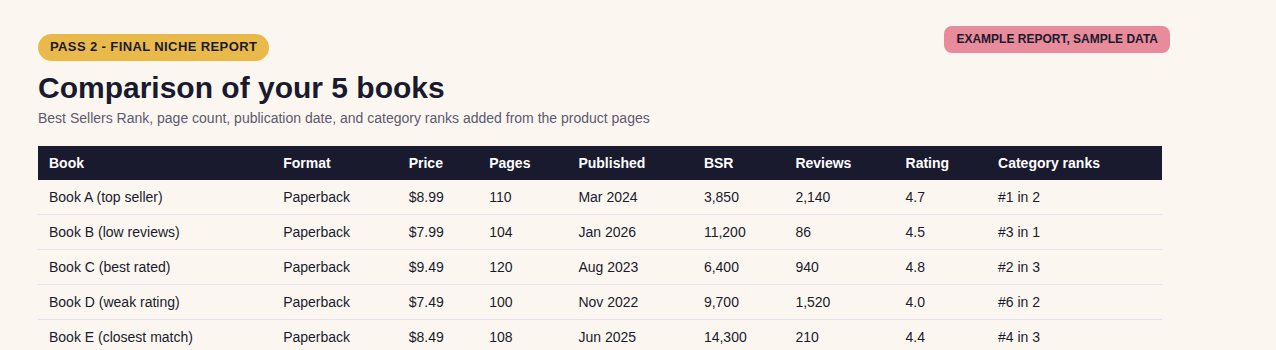
After the deep check, you get a comparison of your 5 books, a read on sales, the categories they use, and what to do next. Example report with sample data.
What your report tells you
A GO, CAUTION, or NO-GO verdict
An opportunity score from 1 to 10, with the three reasons behind it.
Review counts
How many reviews the top books have, and how many are new releases with only a few.
Price bands by format
Ebook, paperback, and audiobook priced separately, with the band where most top sellers sit.
Title patterns
The keywords and hooks the top books repeat, and how many titles use each.
Gaps you can fill
Weak ratings, missing formats, angles few books serve, and off-niche books that skew the numbers.
A five-book deep check
Best Sellers Rank, page count, publication date, and category placements for the books that matter most.
Fiction reads
Series and Book 1 counts, Kindle Unlimited share, and how often new books reach the top 20.
Works in your AI tool
Paste it into ChatGPT, Claude, Gemini, or Perplexity. No extension needed.
Check a niche before you commit
Fiction, nonfiction, and puzzle books all start the same way. Save the Amazon page, upload it, and see what’s selling and what you’d be up against.
What you get today
- The Shelf Scan engine, an instructions file you paste into your AI tool, yours to keep
- Setup guide with steps for ChatGPT, Claude, Gemini, and Perplexity, plus example requests
- Two-pass workflow with the start-from-one-bestseller method built in
- Fiction and puzzle ready: reads series, Kindle Unlimited, and low-content niches
- Personal use license for your own research and publishing
Optional add-on at checkout: skip the category hunt
Once Shelf Scan says a niche is worth entering, you still have to find the right Amazon shelf. The Category Compass already did that work.
A map of 800+ Amazon categories, with one-click links
- One-click links to each category’s Top 100 list, so you scan the right pages fast
- Kindle and print lists for fiction, from cozy mystery and romance to Christmas, paranormal, and LGBTQ+ shelves, plus short reads, puzzles, and kids’ activity books
- 64 starting shelves marked, so you know where to begin
- Duplicate shelves flagged, so you scan each list once
- Category Finder mode: describe your book and Shelf Scan names the list to scan first
- Spreadsheet, guide, and CSV. Links checked October 2026
- Click any Buy button on this page.
- On the checkout page, tick the box that looks like the one above.
- Check that your total has gone up before you complete your order.
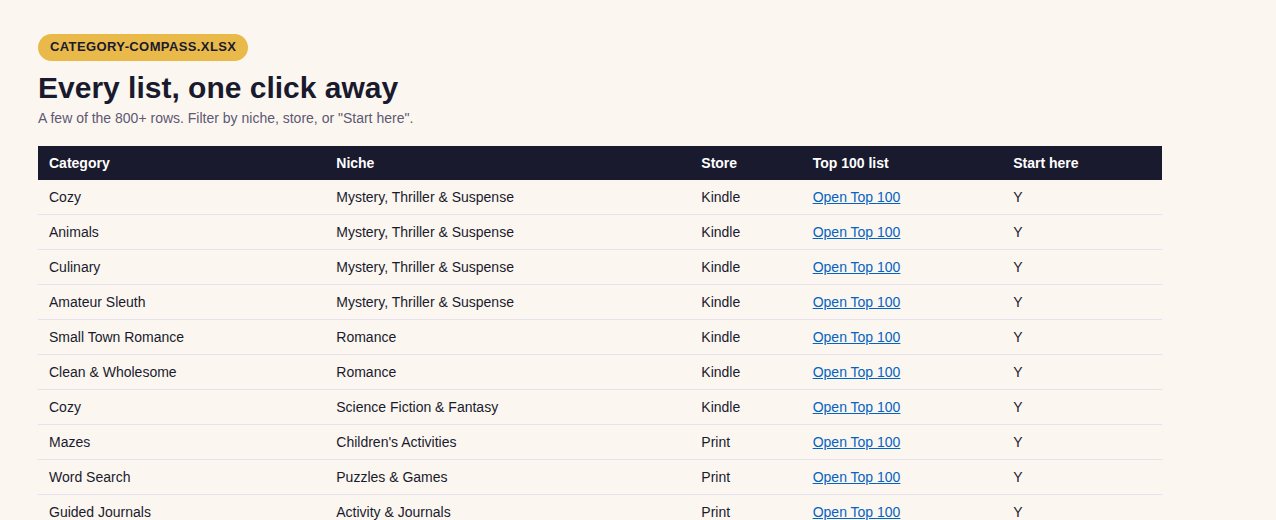
A few rows from the Category Compass spreadsheet. Every category links to its Top 100 list.
Ways to put it to work
Pick your next series niche
See what readers buy before you plan Book 1.
Check a puzzle book idea
Find the price and page count buyers accept before you design a page.
Spot a rating gap
Find leaders with weak reviews and write a better book.
Compare two niches
Scan both and let the report name the stronger pick.
Choose categories with data
Follow a bestseller’s category paths to the smaller shelves.
Re-scan before you publish
Rankings change daily, so check the lists again at launch.
Questions
Does Shelf Scan use bots or connect to Amazon?
No. You save the pages yourself with your browser’s Print to PDF and upload them. Shelf Scan never visits Amazon, so there is no extension to install and nothing to break.
Is this a physical product? Will anything be mailed?
No. It is an instant digital download, and nothing will be mailed.
What do I need to use it?
An account with ChatGPT, Claude, Gemini, or Perplexity that lets you upload PDF files, plus the Chrome browser for saving pages. Upload limits differ by plan, so a paid plan helps if you want several PDFs in one chat.
How do I save an Amazon page as a PDF?
Open the page in Chrome, scroll slowly to the bottom so every result loads, press Ctrl+P (Cmd+P on a Mac), set the destination to Save as PDF, and click Save. Then select all the text (Ctrl+A), copy it, and paste it into your chat with the PDF. The setup guide shows each step.
Why save a PDF and copy the text?
Each shows something the other misses. The PDF shows covers and Kindle Unlimited badges. The text has full titles, series names, and numeric ratings, because Amazon list pages cut long titles and draw ratings as stars. Using both gives the best report, and the PDF alone still works.
How long does a scan take?
Plan on about 10 to 15 minutes per niche, including saving the pages.
Does it work for fiction?
Yes. It reads series, Book 1 counts, and Kindle Unlimited share, and it prices ebooks, paperbacks, and audiobooks separately. It also works for puzzle books.
How accurate are the numbers?
Amazon rankings change hourly, so every report is a snapshot. Sales guides based on Best Sellers Rank are rough estimates and are labeled that way. List pages draw star ratings as pictures and cut off long titles, so Shelf Scan labels estimates and uses the pasted text when you give it. Best Sellers Rank shows on each book’s own page, so the deep check covers the 5 books that matter most, not the whole list. Use the report to decide, then check the lists again before you publish.
Will it tell me my book will sell?
No. Shelf Scan reports what is on the pages you save and gives a judgment call. It does not predict your sales.
What is the Category Compass?
An optional add-on on the checkout page. It is a map of 800+ Amazon categories with one-click links to their Top 100 lists, starting shelves marked, duplicate shelves flagged, and a Category Finder mode for Shelf Scan.
Does the Category Compass cover paperback fiction?
Fiction categories are mapped for Kindle ebooks, and for print Books lists in mystery and thriller, romance, fantasy, science fiction, and literature and fiction. The same shelf often exists in both stores with different top books, so the Compass pairs them. Puzzle, children’s activity, and activity book categories are mapped for print. Amazon changes categories often, so confirm your picks in KDP before you publish.
Is this a subscription?
No. You pay once and keep it.
Can I resell or share it?
No. Shelf Scan comes with a personal use license for your own research and publishing.
What happens after I buy?
Your download is ready right after checkout.
Know your niche before you write a word
Get Shelf Scan for $7 with code HOLIDAY7 while the sale lasts. After the sale, the price goes back to $27.
Get Shelf Scan for $7P.S. For the price of a coffee, you get a research engine you can use for every book you plan, with no monthly fee, ever. The $7 price is for this sale only.